API Integration: Connecting Your CRM, ERP, and Website
The technological landscape of a modern company often resembles an archipelago: you have an island for Sales (CRM), an island for Accounting (ERP), an island for E-commerce (Web), and an island for Marketing. They all work well separately, but moving between them requires slow, manual “boats” (exporting CSVs, emails, copying and pasting data).
For an IT Manager, this scenario is a nightmare of maintenance and data duplication. The solution is not to buy a “Super Suite” that does everything (poorly), but to perfect API integration.
APIs (Application Programming Interfaces) are the digital bridges that turn that archipelago into a connected continent. Below, we explore how the right architecture can save your operations team from chaos.
The Problem of “Information Silos”
Having 5 systems that don’t talk to each other is not just a technical annoyance; it’s a financial brake.
- Dirty Data: The customer updates their address on the web, but the ERP still has the old one. Result: Failed shipments.
- Operational Blindness: Sales closes a deal in the CRM, but Finance doesn’t find out until the end of the month. Result: Late invoicing.
- Wasted Time: Your team spends hours on manual drudgery instead of analysis.
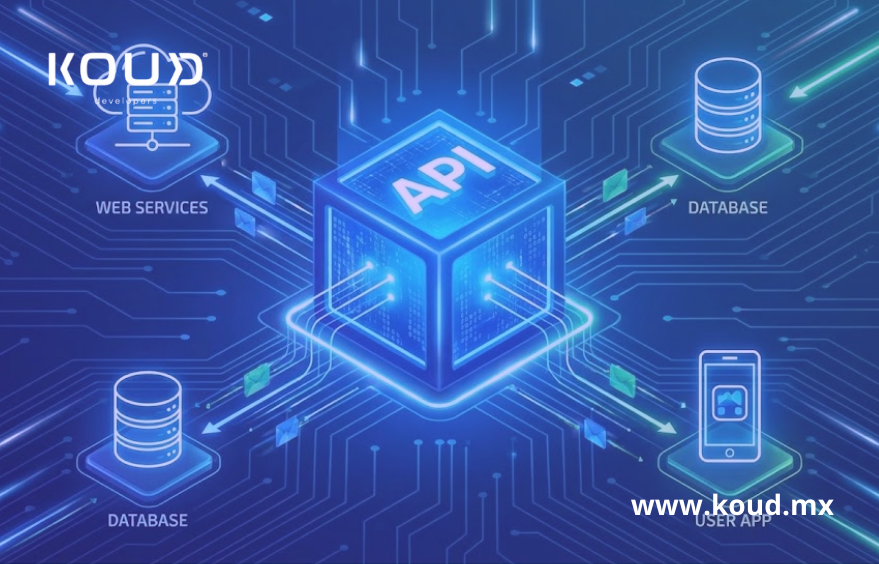
API integration solves this by allowing systems to “converse” in real-time, without human intervention.
Microservices: Cleaning Up the Mess with Architecture
Here is the secret many consultancies won’t tell you: Connecting everything with everything (Point-to-Point) creates unmaintainable “spaghetti code.” If you change the ERP, 10 connections break.
Koud’s modern approach is to use a microservices architecture or Middleware.
Technical Insight: Instead of connecting the CRM directly to the ERP, we create an intelligent intermediate layer. This layer receives the data, translates it, and delivers it.
This makes API integration scalable. If tomorrow you switch from Salesforce to HubSpot, you only adjust the connector, not the entire infrastructure. This architectural cleanliness is vital for robust workflow automation.
The Holy Grail: Connect ERP with CRM
This is the most requested use case with the highest Return on Investment (ROI). By managing to connect ERP with CRM via REST or SOAP APIs, you achieve a magical bidirectional flow:
- Sales: A salesperson closes a deal in the CRM.
- API Trigger: Automatically, the API sends the order to the ERP.
- Finance/Logistics: The ERP generates the invoice and the warehouse order instantly.
- Feedback: When the product ships, the ERP notifies the CRM, and the salesperson sees the “Shipped” status without having to call the warehouse.
Without API integration, this process would take days and back-and-forth emails. With it, it takes milliseconds.
Workflow Automation: Beyond Moving Data
Integration isn’t just moving a piece of data from A to B. It’s about triggering actions.
A good API integration strategy allows for complex workflow automation:
- E-commerce: If stock in the ERP drops below 10 units, pause the Facebook ad campaign (via Marketing API) and update the stock on the website (via E-commerce API).
- Support: If a VIP client opens a ticket, alert the Account Manager on Slack.
These automated business rules are what truly transform operational efficiency.
Security in Connection
Opening your systems to the world (or to each other) carries risks if not done right. A professional API integration must include:
- OAuth2 Authentication: To ensure only authorized systems connect.
- Rate Limiting: To prevent an error from saturating your server with requests.
- SSL/TLS Encryption: To ensure data travels securely.
Frequently Asked Questions
Do I need my systems to be from the same brand to integrate them?
No. That is the beauty of APIs. Thanks to standards like JSON and XML, you can connect a modern cloud CRM with an old ERP installed on a local server (On-Premise), as long as the correct interface is built.
Which is better: real-time or batch integration?
It depends on the process. For inventory and sales, real-time API integration is critical. For massive accounting reports, a nightly Batch process might be more efficient to avoid saturating the network.
Is it safe to connect my ERP to my website?
Yes, if done via a secure API. API integration acts as a filter; the website never enters your ERP, it only “asks for” and “sends” specific data through an armored window.
Conclusion
Letting your systems operate as isolated islands is a costly decision. Interoperability is no longer a technological luxury; it is the operational standard. A solid API integration strategy not only saves time but gives you the “Single Source of Truth” regarding your data that you need to make decisions.
Don’t keep operating with manual patches. It’s time to orchestrate your technology.
Systems not talking to each other?
At Koud.mx, we are experts in building the digital bridges your company needs. Let’s talk about how to connect ERP with CRM and automate your operation today.